
Measuring the Miniloong Pocket 1's refresh rate
Leaf can drive the Miniloong Pocket 1’s panel at 60, 90, or 120 Hz. The panel only advertises one mode, 720x960 at 60 Hz, so everything above that is an overclock of a custom timing. That raises a fair question: when the driver says 120 Hz, is the screen actually showing 120 distinct images per second?
Every easy answer reads the wrong end of the pipeline. The pixel clock, the mode string, a program’s own frame counter: all of them describe what the SoC is sending, not what the panel is doing. This page is the measurement that reads the panel.
Short answer: 119.85 Hz measured optically, against a programmed 120.000.
What the rate actually is
Section titled “What the rate actually is”The panel’s blanking timings are held constant and only the pixel clock scales, so the modeline is:
mode=<clk> 720 735 749 769 960 990 998 1018 -hsync -vsyncHorizontal totals 769, vertical totals 1018, giving 769 x 1018 = 782,842 pixels per
frame. The clock for any target rate is:
clk_MHz = 782842 x Hz / 1,000,000 = 0.782842 x Hz| Rate | Pixel clock |
|---|---|
| 60 Hz | 46.97 MHz |
| 100 Hz | 78.28 MHz |
| 120 Hz | 93.94 MHz |
At 120 Hz the driver reports clk[93940] real_clk[93940]. Requested and achieved are
identical, and both match the formula exactly. That is a good sign, but it is still
the source side.
Why filming it is harder than it looks
Section titled “Why filming it is harder than it looks”The obvious experiment is to flash a color every frame, film it in slow motion, and find the frequency. It does not work, and it fails in a way that produces a confident wrong answer.
An iPhone’s slow motion captures at a nominal 240 fps. A 120 Hz display filmed at 240 fps sits exactly at the Nyquist limit:
f_display / f_camera = 120 / 240 = 0.5At exactly half the sampling rate, a signal cannot be distinguished from the sampler itself. Run an FFT on that footage and the peak lands on the camera. Our first attempt returned a 79.976 Hz fundamental, and since the pattern cycled three colors, 79.976 x 3 = 239.9 Hz. That is the phone, not the panel, and it was identical across all three color channels.
Counting color changes instead does not save it, because a rolling-shutter sensor smears transitions and silently drops some. The same footage yielded 108 Hz or 147 Hz depending on how the counting was done.
Two further traps sit underneath:
The camera’s real rate is not its nominal rate. Our capture measured 177.74 fps on one attempt, not 240.
iOS re-times slow motion on export. The shared file is stamped at 30 fps playback
(full-frame-rate-playback-intent=0, exactly 33.333 ms between frames). Fitting
against those timestamps reads low by the slowdown factor.
The method: an absolute frame counter
Section titled “The method: an absolute frame counter”Rather than measure a frequency, display a number and read it.
vsyncmark draws a 13-bit counter as a row of black and white cells, incrementing
once per vsync’d present, with a white reference bar above and a black one below.
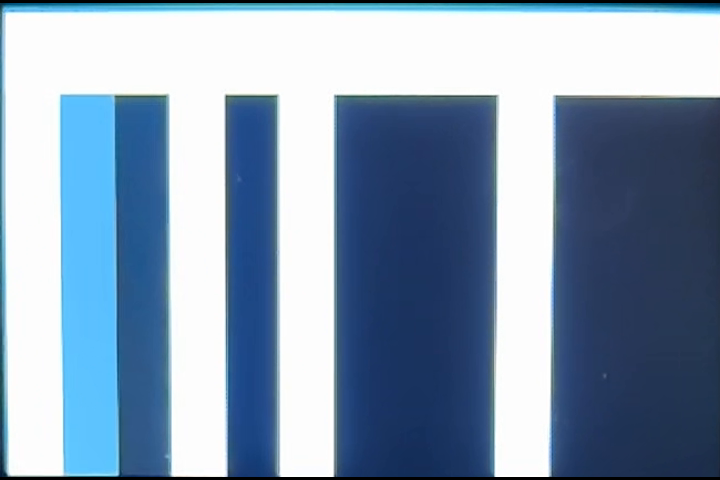
Every legible camera frame now carries the exact display-frame index at that instant. Refresh becomes the slope of counter against frame number, fitted by least squares over thousands of samples. This sidesteps all three problems at once: no frequency is estimated so nothing can alias, a dropped camera frame just leaves a gap in the fit, and frame index survives an export that rewrites timestamps.
Why the counter is Gray coded
Section titled “Why the counter is Gray coded”A rolling-shutter sensor reads its rows over several milliseconds, so a single camera frame can straddle two counter values. In plain binary that is catastrophic: counting from 4095 to 4096 flips all thirteen bits at once, and a straddled read could land anywhere in between.
Gray code changes exactly one bit between consecutive values:
4 -> 0110 5 -> 0111 one bit differs 6 -> 0101 one bit differs 7 -> 0100 one bit differsA straddled read is therefore wrong by at most one count instead of thousands. Decoding back to binary is a cascade of XOR shifts:
b = g XOR (g >> 1) XOR (g >> 2) XOR (g >> 4) XOR (g >> 8) ...Each camera frame is decoded independently for every pixel row, and the majority value wins. Rows that caught the transition are outvoted by rows that did not.
Why the ratio is the important number
Section titled “Why the ratio is the important number”The counter advances once per display frame, so across the clip:
counts per camera frame = refresh_Hz / camera_fpsBoth quantities on the right are unknown, which looks unhelpful. But film two rates with the same camera and divide:
(refresh_A / camera_fps) refresh_A------------------------ = ---------(refresh_B / camera_fps) refresh_BThe camera’s rate cancels completely. No assumption about 240 fps, no reliance on metadata, no timestamps. If the 120 Hz clip yields exactly twice the counts per frame of the 60 Hz clip, the panel doubled, and no property of the camera can change that conclusion.
Procedure
Section titled “Procedure”- Set the panel rate and confirm it from the driver:
cat /sys/kernel/debug/dri/0/summary - Run
vsyncmarkon the device over Weston. - Film about 25 seconds at 240 fps, screen filling the frame, room dark so the panel is the only light source.
- Decode every frame, read the counter, fit slope against frame index.
The 60 Hz run is the control, and it comes first. Native 60 needs no overclock, so it is the one rate that is true by construction. If the pipeline does not return 60 on it, the pipeline is wrong and its answer at 120 means nothing.
Results
Section titled “Results”Filmed back to back with identical camera settings.
60 Hz, the control
Section titled “60 Hz, the control”counts per camera frame 0.249883 (one per 4.0019)residual RMS 0.563 countslegible frames 8307 / 8314measured refresh 59.9719 HzOne display frame per 4.0019 camera frames. Four is exactly 240 / 60, so the footage independently confirms the capture rate as well as the panel.
120 Hz
Section titled “120 Hz”counts per camera frame 0.499371 (one per 2.0025)residual RMS 1.184 countsmeasured refresh 119.8490 HzThe comparison
Section titled “The comparison”0.499371 / 0.249883 = 1.9984Within 0.08% of exactly 2, with the camera eliminated from the calculation.
Why this proves 120 Hz
Section titled “Why this proves 120 Hz”The counter advances once per present, and presents are throttled to vsync. A program cannot present faster than the panel refreshes, so:
present rate <= vblank rateMeasuring 119.85 presents per second optically therefore puts a lower bound of 119.85 Hz on the panel’s vblank rate. The mode is programmed at exactly 120.000 Hz and the PLL readback confirms the clock landed on target. A lower bound of 119.85 against a programmed 120 leaves nothing else the panel can be doing.
The inequality only runs one way, which is worth stating plainly: a measurement below the target would be ambiguous, because it could mean either a slower panel or a program missing frames. A measurement at the target is not ambiguous.
What this does not prove
Section titled “What this does not prove”The measurement reads the vblank rate, which is the panel’s timing. It does not formally prove that every vblank produces a distinct visible image rather than the panel accepting the timing and holding pixels.
In practice the distinction is hard to make matter. A panel that failed to lock a timing this far from its native mode would not show a subtly worse picture; it would show no valid image at all, which is not what we measured or saw.
The measurement also says nothing about rates above 120. 110 Hz is the highest rate that produces zero VOP errors in the kernel log, and 120 logs a single output-buffer underrun at the mode switch itself with no recurrence under load, so 120 is one small step past the conservative ceiling rather than a limit that has been probed.
Reproducing it
Section titled “Reproducing it”The tools are vsyncmark.c and analyze_vsyncmark.py. The analyzer locates the
pattern from the reference bars rather than assuming where it sits, so it tolerates
framing that does not perfectly fill the camera frame:
python3 analyze_vsyncmark.py rate120.mov --camera-fps 240It reports counts per camera frame, the residual scatter of the fit, and a rolling rate across the clip. Two numbers tell you whether to trust the result: residual RMS should be well under one count, and the rolling rate should be flat.
One practical note. The counter measures what the program presented, so the program
has to keep up. On this device the GPU idles at 200 MHz under simple_ondemand, which
is not enough to sustain 120 presents per second. Setting
/sys/class/devfreq/fde60000.gpu/governor to performance raises it to 800 MHz and
holds the rate.
The clips above are 10-second excerpts, downscaled and compressed for the web. They are already slowed 8x by the phone, so what looks like a leisurely count is running at 120 steps per second in real time.