
Fugazi
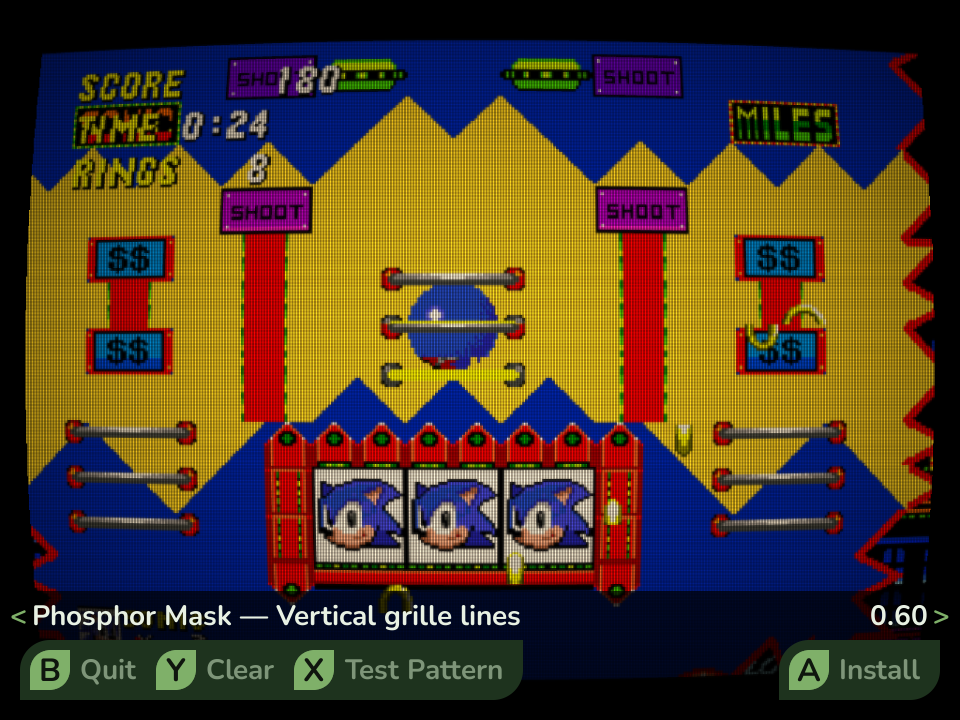
Fugazi is Leaf’s specialized global CRT tuner. It shows a full-screen live preview, lets you adjust the look in real time, and can apply that look to every RetroArch game.
For a ready-made shader on one game, start with MENU > Shader instead. Use Fugazi when you want to tune its curvature, scanlines, mask, and color globally.
How it works
Section titled “How it works”You tune eight settings against a live preview. Apply bakes those values into a two-pass GLSL preset and installs it as RetroArch’s global automatic preset. The next RetroArch game loads it automatically.
Fugazi treats a global preset as your durable data. It recognizes its own preset by content and will not silently overwrite or remove an unknown one.
What you can adjust
Section titled “What you can adjust”- Curvature - bends the screen edges like a tube.
- Glow - adds soft light bleed around bright areas.
- Scanlines - controls the dark horizontal lines.
- Gap Darkness - changes the darkness between scanlines.
- Phosphor Mask - adds the faint vertical grille of a CRT.
- Vignette - darkens the corners.
- Brightness - offsets the darkening from the other effects.
- Warmth - adds a slight warm tint.
Controls
Section titled “Controls”| Button | Action |
|---|---|
| Up / Down | Pick a setting |
| Left / Right | Fine adjustment |
| L1 / R1 | Coarse adjustment |
| X | Toggle between the game image and test pattern |
| Y | Reset the tuner values to no visible effect |
| A | Apply the current tuning globally |
| START | Remove Fugazi or resolve a conflicting preset state |
| B | Quit |
Reset is not Remove. Pressing Y changes the tuner values only. If Fugazi is already installed globally, resetting the sliders does not uninstall its preset. Use START > Remove to disable Fugazi.
Apply or remove a global preset
Section titled “Apply or remove a global preset”When no global preset exists, Apply installs Fugazi. When Fugazi already owns the global preset, Apply updates it.
If another global preset is active, Fugazi asks before replacing it. Confirming
the replacement preserves that preset as global.glslp.fugazi-backup before
Fugazi installs its own. Only one predecessor is kept.
Remove behaves according to ownership:
- If Fugazi owns the global preset and no backup exists, Remove deletes only Fugazi’s automatic preset.
- If Fugazi owns the global preset and a backup exists, Remove restores that preset byte-for-byte.
- If another preset owns the global path, Remove refuses to delete it.
Removing Fugazi leaves its small generated shader files in place. They are harmless and may still be referenced by a running game or another preset.
Fugazi says the state needs attention
Section titled “Fugazi says the state needs attention”Fugazi shows State needs attention when another current global preset and a Fugazi backup coexist. This can happen if you apply Fugazi over one global preset, then save a different All RetroArch shader later.
Press START and deliberately choose one action:
- Keep current keeps the current global preset and discards Fugazi’s saved predecessor.
- Restore previous replaces the current global preset with the preserved predecessor.
- Cancel leaves both files untouched.
Fugazi will not guess which preset you meant to keep. Resolve this state before trying Apply again, and do not delete the files by hand.
Status messages
Section titled “Status messages”| Status | Meaning |
|---|---|
| Not applied | No global automatic preset exists |
| Applied globally | Fugazi owns the global preset |
| Applied globally - previous shader preserved | Fugazi owns the global preset and Remove will restore one predecessor |
| Another global shader is active | A preset Fugazi does not own is current |
| State needs attention | Another current preset and Fugazi’s backup both exist |
- CRT effects darken the picture. Raise Brightness and the backlight under Settings > Display & Sound if needed.
- Press X to compare the game image with the test pattern.
- A more specific game, folder, or core shader can override Fugazi within the same automatic-preset directory. See RetroArch shaders.
- Saving another global preset can replace Fugazi. Open Fugazi again if you need to resolve the preserved predecessor.
Fugazi is open source under the MIT license.