
Nimbus
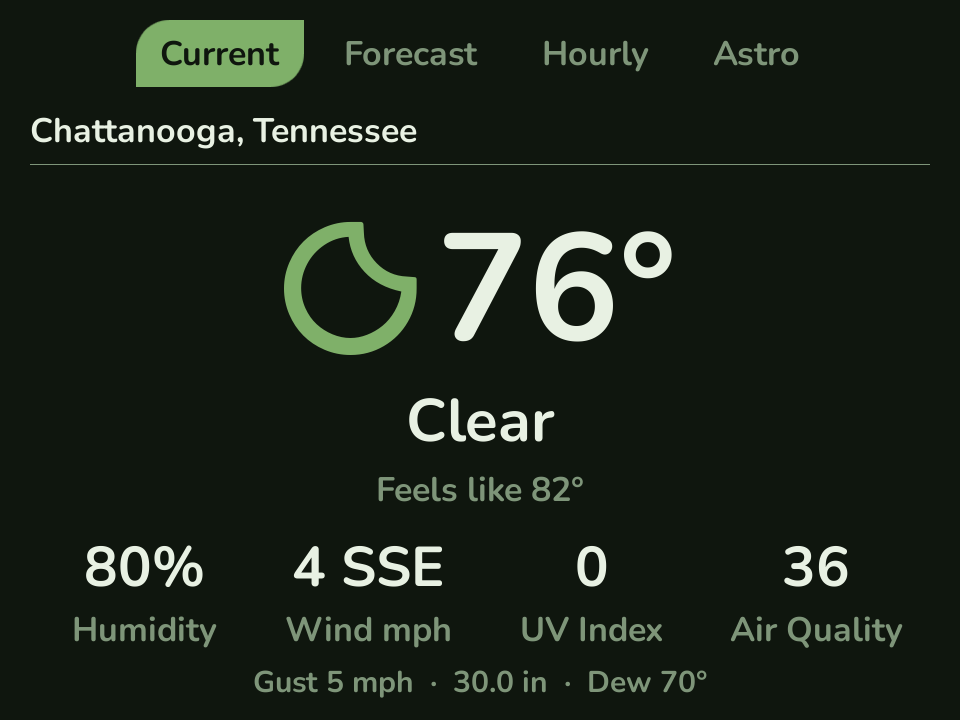
Nimbus is a weather app built for a screen you glance at, not one you study. A big temperature, a bold weather glyph, and the few numbers that matter, all in your Leaf color scheme. It covers current conditions, a three-day forecast, an hourly timeline, and sun and moon details.
There is nothing to set up. Nimbus uses Open-Meteo for weather, so it needs no account and no API key. Open it and it finds your location and shows the weather.
Install
Section titled “Install”Nimbus is a standalone app, not bundled with Leaf. Install it on-device with Pak Rat: press the Menu button, open Actions → Pak Rat, choose Nimbus, and install it over Wi-Fi. It appears in your Apps tab when the install finishes.
Manual fallback: open the
latest release,
download Nimbus.pak.zip, unzip it, copy the Nimbus.pak folder into
Apps/mlp1/ on your SD card, then run System → Rescan Library. Nimbus is
open source (MIT).
Features
Section titled “Features”- Four views - Current, a three-day Forecast, an Hourly timeline, and Astro for sunrise, sunset, day length, and the moon phase. Switch views with L1 / R1.
- Big and glanceable - a large weather glyph beside a huge temperature, then the stats that matter: humidity, wind, UV, and air quality. With Show Hints off, a details line adds gusts, pressure, and dew point. Built for the handheld, not shrunk down from a phone.
- Looks like Leaf - it inherits your color scheme, font, and selection style, and the weather glyphs pick up your theme color.
- Many places - search by city or postal code, or let it find you automatically. Flip between your saved locations with Left / Right.
- Instant, then fresh - it shows your last weather right away and refreshes in the background, so it never makes you wait on the network.
- Works offline - the last forecast is cached, and you can switch units (Fahrenheit or Celsius) and clock (12 or 24 hour) any time.
Locations
Section titled “Locations”Press Y for the menu, then Locations, to manage your places. X adds a new one (search by city or postal code), and A opens options to set a location as home or delete it. Your home location is what Nimbus opens to.
Controls
Section titled “Controls”| Button | Action |
|---|---|
| L1 / R1 | switch view (Current, Forecast, Hourly, Astro) |
| Left / Right | switch saved location |
| Up / Down | scroll the view |
| Y | open the menu (Units, Time, Locations, About) |
| B | quit |
Units, time format, locations, and the About page all live under the Y menu. Weather data is by Open-Meteo (CC-BY 4.0).